
Not everyone works in 25-minute blocks.
Focusmeter's custom timers let you build any focus-rest sequence, save it, name it, and switch in one tap.
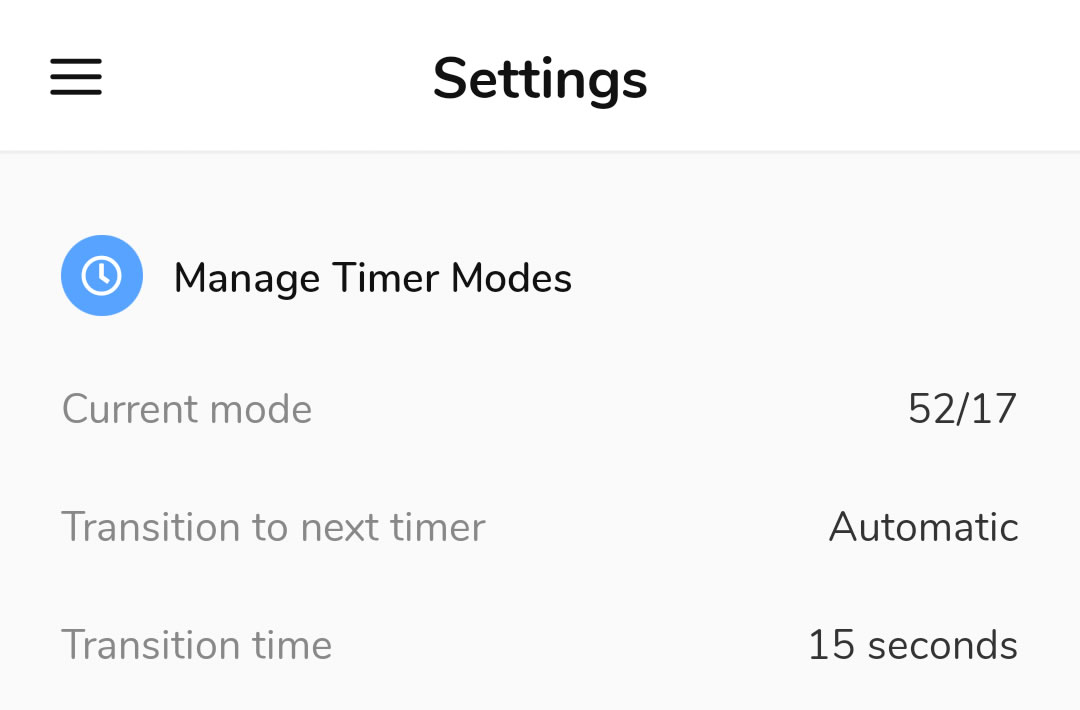

The 25/5 rule is only a start.
Most focus apps lock you into 25/5. If that doesn't match how you actually work, you're stuck.
Studying for an exam is different from a deep writing session. The 52/17 rule — 52 minutes of focus, 17 of rest — has solid research behind it, but most apps won't let you run it.
Focusmeter doesn't pick a method for you.
Build it once. Use it every day.
Thirty seconds to set up. After that, your modes are always one tap away.
Every part of the timer is yours.
Focus time, rest time, rounds — set it once, come back to it any session.
Any interval you want
Set focus sessions from a few minutes to several hours. No locked minimum or maximum — use what research and experience tell you actually works.
Different modes for different work
Your deep writing session doesn't work like your email triage or your exam study block. Build a mode for each. Switch without reconfiguring anything.
Runs on autopilot
Enable auto-restart on any mode and Focusmeter keeps cycling — focus, rest, focus, rest — until you decide to stop. No tapping to continue.
Popular sequences in Focusmeter
Pick one, tweak it, or start from scratch.
Pomodoro
The standard. Four rounds, then a longer rest. Works well for tasks that benefit from frequent reset points — email, admin, shallow work.
52/17 Rule
DeskTime tracked the habits of the most productive 10% of workers and found they averaged 52 minutes of focus followed by a genuine 17-minute break. One of the few Android apps that supports this out of the box.
Learn more about the 52/17 rule →Deep Work Block
Cognitive research points to ultradian rhythms of roughly 90 minutes. Many writers, researchers, and programmers work in single uninterrupted 90-minute blocks with substantial rest in between.
Your own method
You've likely already figured out what works. Focusmeter lets you set it, name it, save it, and come back to it — without reconstructing it from scratch every session.
Other apps choose a method for you
Focusmeter is one of the few that doesn't.
| Focusmeter | Forest | Engross | |
|---|---|---|---|
| Custom focus duration | Limited | ||
| Custom rest duration | |||
| Multiple saved modes | |||
| 52/17 support | |||
| Switch modes without settings | — | — | |
| No ads (free tier) |
What Focusmeter users say
"I really like the extra modes (added 52/17) and on the fly changes you can make!"
"I love the way it's customisable timer with the rest period included. Other apps provide this option only if you've bought their subscription."
"Hands down the best focus app for Android. No unnecessary ads, no limited options only for premium users — everything in the interface can be edited according to the user's preference."
"One of the best Pomodoro timer apps, simple and straight to the point. Best features: able to add in your own modes, simple calendar to see how much you have studied."
"Always keep coming back after uninstalling other apps, because of its customizable feature for pomodoro and the tracking system. Been using it for 3 years."
"Finally a great, simple pomodoro timer with all the features I need! Customizable timers, alert sounds, one minute warning, extension timers."
"The app perfectly customizes focus/rest timers. It offers great stats, session tags, distraction logs, dark mode, and background use. Simple, reliable, and effective."
"Best pomodoro app hands down. Minimum distraction. Minimalist UI. Tons of customisation. Custom session addition to records is chef's kiss."
"I really appreciate advanced statistics, tags and custom times in free version. If I use it often, I will also consider the PRO version."
"Focus Meter is the best, has all the useful functions, you can create your own routines. Tested dozens on Android and PC — this is the one."
"It's very customisable and it has every essential feature without paying. When I had a problem and posted a review, I got a reply very quickly. 10/10 app."
"The free plan feels premium and is very powerful. There is nothing you can't do with the free plan. Very customizable as well."
Common questions
Do I have to use Pomodoro?
No. Pomodoro is one option among many. You can create any sequence — or use a built-in preset like 52/17 — and switch between modes at any time.
How many modes can I save?
As many as you want. There's no limit on saved modes. Pro users can also pin shortcuts for quick access directly from the timer screen.
Can Focusmeter automatically move to the next timer without me tapping?
Yes. Enable auto-next and the timer transitions from focus to rest (and back) automatically with a configurable delay between sessions.
Does the timer keep running if I switch to another app?
Yes. Focusmeter runs in the background — you don't need to keep it open on screen for the timer to continue.
How does this compare to Forest?
Forest is great for motivation — the visual hook keeps many people accountable. But it locks you into one timer mode with no rest tracking and no analytics. If you want to know what you actually worked on and for how long, Focusmeter gives you that without the gamification.
Set your sequence. Use it every day.
You already know roughly how long you can stay focused before needing a break. Build a mode around that — save it, name it, and it's one tap away every session.
Download Free on Google PlayNo ads. Free to use.